
Latest Version
Madiha Ali
Mac
Free
6754551780
Report a Problem
More About Easy Access Mail App for Gmail
The Challenge of Managing Multiple Gmail Accounts on Mac
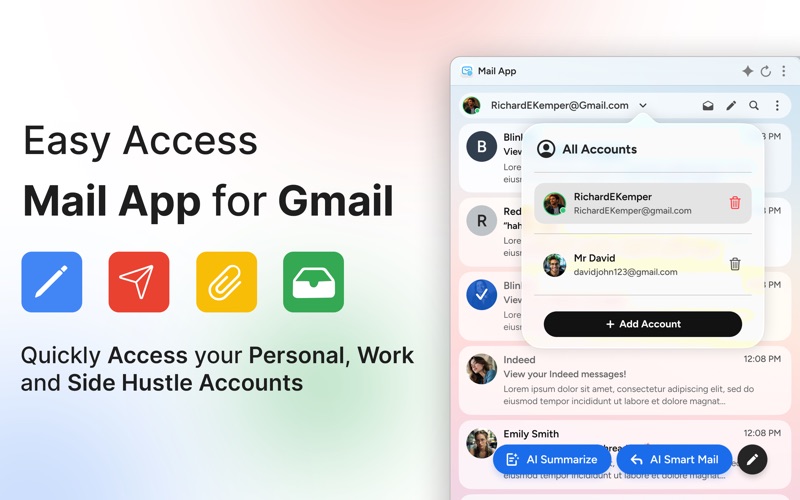
For professionals and power users, keeping up with multiple email accounts can quickly lead to browser tab overload. Switching between personal Gmail accounts and corporate Google Workspace environments in a web browser is often slow and disruptive. The Easy Access Mail App for Gmail macOS client addresses this exact daily hassle, bringing your entire email workflow directly onto your desktop as a native, streamlined application.
Developed by Madiha Ali, this dedicated macOS utility is designed specifically for users who need a faster, more integrated way to manage their Google-based correspondence without leaving their desktop environment.
Key Features of the Easy Access Mail App for Gmail macOS Client
Rather than simply mirroring the web interface, this application introduces several platform-specific enhancements that improve daily productivity:
- Unified Inbox: Consolidate multiple Gmail and Google Workspace accounts into a single, cohesive view to monitor all incoming correspondence simultaneously.
- Sleek Menu Bar Access: Check for new messages, read incoming mail, or compose quick drafts directly from the macOS menu bar without opening the main window.
- Offline Mode: Continue working even when disconnected. Draft new emails and manage your folders offline; the app syncs automatically once your connection returns.
- Rich Text Composer & Smart Search: Write polished, professional emails with full formatting control, and locate archived threads instantly using advanced search filters.
- Drag-and-Drop Attachments: Seamlessly drag files from your Finder directly into your email drafts for rapid sending.
Who is This macOS Mail Client For?
This software is tailored specifically for Mac users who find browser-based email management inefficient. If you operate within the macOS ecosystem and manage multiple Google Workspace identities for client work, freelancing, or personal projects, having a dedicated, privacy-focused desktop client can significantly clean up your workspace. Because all data remains locally with the user's account and is not stored on external servers, it offers peace of mind for security-conscious professionals.
Is the Easy Access Mail App for Gmail macOS Client Right for You?
If you are looking to declutter your web browser and transition to a native desktop email experience, this app offers an elegant, feature-rich solution. Please note that while the app is free to download, a subscription plan is required to unlock and utilize its full suite of features.
To explore the interface and view the subscription terms, visit the official Mac App Store listing for the Easy Access Mail App for Gmail to see if it fits your daily workflow.
Rate the App
User Reviews
Other Apps in This Category



Popular Apps










Editor's Choice